Sunday, 24 May 2009
How to fix MS Visual studio Error " The filename, directory name, or volume label syntax is incorrect.(Exception from HResult:0x8007007B) "
Thursday, 16 April 2009
AJAX in ASP.NET Part-2
- AddNew Item->Web Form in Your website .
- Place Script manger and UpdatePanel from toolbox on form.
<asp:ScriptManager ID="ScriptManager1" runat="server">
asp:ScriptManager>
<asp:UpdatePanel ID="UpdatePanel1" runat="server">
<ContentTemplate>
ContentTemplate>
After placing these components,VS automatically place this directive in html designer view.
<%@ Register Assembly="System.Web.Extensions, Version=1.0.61025.0, Culture=neutral, PublicKeyToken=31bf3856ad364e35"
Namespace="System.Web.UI" TagPrefix="asp" %>
<httpHandlers>
<remove verb="*" path="*.asmx"/>
<add verb="*" path="*.asmx" validate="false" type="System.Web.Script.Services.ScriptHandlerFactory, System.Web.Extensions, Version=1.0.61025.0, Culture=neutral, PublicKeyToken=31bf3856ad364e35"/>
<add verb="*" path="*_AppService.axd" validate="false" type="System.Web.Script.Services.ScriptHandlerFactory, System.Web.Extensions, Version=1.0.61025.0, Culture=neutral, PublicKeyToken=31bf3856ad364e35"/>
<add verb="GET,HEAD" path="ScriptResource.axd" type="System.Web.Handlers.ScriptResourceHandler, System.Web.Extensions, Version=1.0.61025.0, Culture=neutral, PublicKeyToken=31bf3856ad364e35" validate="false"/>
httpHandlers>
<httpModules>
<add name="ScriptModule" type="System.Web.Handlers.ScriptModule, System.Web.Extensions, Version=1.0.61025.0, Culture=neutral, PublicKeyToken=31bf3856ad364e35"/>
httpModules>
system.web>
You can also copy paste this section from web.config file of AJAX ENABLED ASP.NET WEBSITE Template
If you are new to httphandlers and httpmodule , read this post
Httphandlers and HttpModules
Place a calendar and label control in update panel.Place a label control outside updatepanel .
<ContentTemplate>
<asp:Label ID="LBLDateselected" runat="server">asp:Label>
<asp:Calendar ID="Calendar1" runat="server" BackColor="#FFFFCC" BorderColor="#FFCC66"
BorderWidth="1px" DayNameFormat="Shortest" Font-Names="Verdana" Font-Size="8pt"
ForeColor="#663399" Height="200px" OnSelectionChanged="Calendar1_SelectionChanged"
ShowGridLines="True" Width="220px">
<SelectedDayStyle BackColor="#CCCCFF" Font-Bold="True" />
<SelectorStyle BackColor="#FFCC66" />
<TodayDayStyle BackColor="#FFCC66" ForeColor="White" />
<OtherMonthDayStyle ForeColor="#CC9966" />
<NextPrevStyle Font-Size="9pt" ForeColor="#FFFFCC" />
<DayHeaderStyle BackColor="#FFCC66" Font-Bold="True" Height="1px" />
<TitleStyle BackColor="#990000" Font-Bold="True" Font-Size="9pt" ForeColor="#FFFFCC" />
asp:Calendar>
ContentTemplate>
on page load place code
Label2.Text = DateTime.Now.ToLongTimeString();
and on calendar's Calendar1_SelectionChanged event place this code
protected void Calendar1_SelectionChanged(object sender, EventArgs e)
{
LBLDateselected.Text = Calendar1.SelectedDate.ToLongDateString();
}
as you can see page is not postingback while clicking on calendar, it means code that has been placed in page load event wont be executed. only code for controls or in events of controls that are placed in update panel will be executed.
Wednesday, 15 April 2009
AJAX in ASP.NET Overview Part-1
Main Object in AJAX is XMLHttpRequest ,with this object,clients can submit and retrieve XML data to /from server without postbacks or reloading page.
var _reqObject= new XMLHttpRequest();
Every latest browser support this object however Internet explorer 6 or old versions doest not.To declare XMLHttpRequest for older browser compatibility,following active- X syntax is used as it would be treated as active-X control.
var _reqObject = new ActiveXObject("MSXML2.XMLHTTP.3.0");
So basically there is lot of workaround for browser checks in code.AJAX components in ASP.NET made it all easier.
ASP.NET AJAX Contains Server side and clients side components. Where Client side components contains Javascript libraries (.js) that can be extended and can also be used in non-asp.net page. It also contains cross browsers compatibility scripts.
Server side contains Controls, UpdatePanel,ScriptManager.
AJAX Library can also be used to call web service(.asmx extensions) .
Before processing to our sample, we need to download
ASP.NET AJAX 1.0
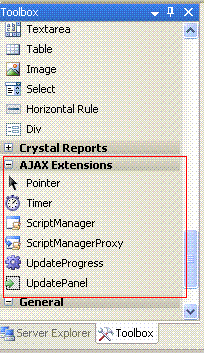
download it from above link for visual studio 2005. This toolkit is for ASP.NET 2.0, for ASP.NET 3.5, ASP.NET AJAX is built-In feature.After Installation of ASPAJAXExtSetup.msi and restarting Visual studio, AJAX extensions is installed in toolbox.- ScriptManager.
- UpdatePanel
- Timer
ScriptManager must be placed on page before placing any other AJAX server control o page, as it manages all AJAX Script libraries and files.
END of PART-1
Monday, 6 April 2009
Integrating Instant MSN messenger in ASP.NET
Note:You also need to know about STA and MTA Thread pool.
- Open Menu->Type "C:\Program Files\Messenger" in Run.
- msmsgs.exe is our target to convert it to .Net assembly.
- Goto MS visual studio 2005 tools->open Visula studio 2005 Command prompt.
- type following command
Select Converted Dll from Add refernence window.
Now Switch to code view and this code.
using System;
using System.Data;
using System.Configuration;
using System.Collections;
using System.Web;
using System.Web.Security;
using System.Web.UI;
using System.Web.UI.WebControls;
using System.Web.UI.WebControls.WebParts;
using System.Web.UI.HtmlControls;
using inetpubdotnetmsgr;
public partial class Messenger : System.Web.UI.Page
{
protected void Page_Load(object sender, EventArgs e)
{
if (IsPostBack==false)
{
MsgrObjectClass _messngerobject = new MsgrObjectClass();
_messngerobject.Logoff();
//IMsgrService _ImessngerService = _messngerobject.IMsgrObject_Services.PrimaryService;
_messngerobject.Logon("myuserid@hotmail.com", "mypassword", _messngerobject.Services.PrimaryService);
IMsgrUsers _Users = _messngerobject.get_List(MLIST.MLIST_CONTACT);
foreach (IMsgrUser _user in _Users)
{
ListBox1.Items.Add(_user.EmailAddress.ToString());
}
}
}
}
You aslo need to set permission on new generated Dll for asp.net User.
Friday, 3 April 2009
Converting classic ASP page to ASP.NET aspx page
<%@ Page AspCompat ="true" %>
<%@ ASPCOMPAT="true" %> directive, is for STA Single threaded apartment pool.
Late Binding
as always, asp might contain adodb library and connection to database. C# is strongly typed language , we can not simply use ADODB in it.
so we need reflection namespace for binding.
<%@ Import Namespace="System.Reflection" %>
conn=Server.create("ADODB.Connction");
its methods(Open) and recordset's execute will be invoked thought late binding.
conn.GetType().InvokeMember("Open",BindiingFlags.InvokeMethod,...)(see MSDN for full parameters details).
It is always a better idea to use early binding for performance reason therfore one can use TLBimp.exe tool to convert old Com components into .Net assemblies.